


SEO results after a website redesign have no fixed deadline: Google must crawl and process your changes before you can judge their effect on search visibility. Google Search Central says recrawling can take a few days to a few weeks, but that is not a promise of higher rankings. For your 2026 redesign, separate successful indexing, recovery of existing traffic, and growth in qualified inquiries—they are different outcomes.
- How long to see SEO results after redesign depends on crawling, indexing, and what changed—not launch day alone.
- Google Search Console helps distinguish indexing problems from changes in rankings and clicks.
- The Little Web Design Shop serves small business owners needing website design and maintenance; a redesign alone does not guarantee search growth.
- Fix broken redirects and blocked pages immediately rather than waiting for rankings to recover.
Why this matters
The Web Design Shop builds and maintains websites for small business owners and organizations. For those businesses, the useful question is not simply when Google notices a new design. It is whether the right people still find the site and complete an inquiry or purchase.
A redesign can improve the buying experience without increasing organic traffic. It can also introduce search problems while making the website look better. Measure visibility and business outcomes separately so you know what needs attention.
How long does it take to see SEO results after a website redesign?
There is no universal waiting period because a redesign can change anything from page colors to the entire website structure. Google’s processing time is only part of the picture; preserving useful content and matching search intent also matter.
For 2026 planning, Google Search Central’s guidance on requesting a recrawl describes crawling as taking a few days to a few weeks. Its site-move guidance also explains that processing happens URL by URL. Neither establishes a deadline for improved rankings or more sales.
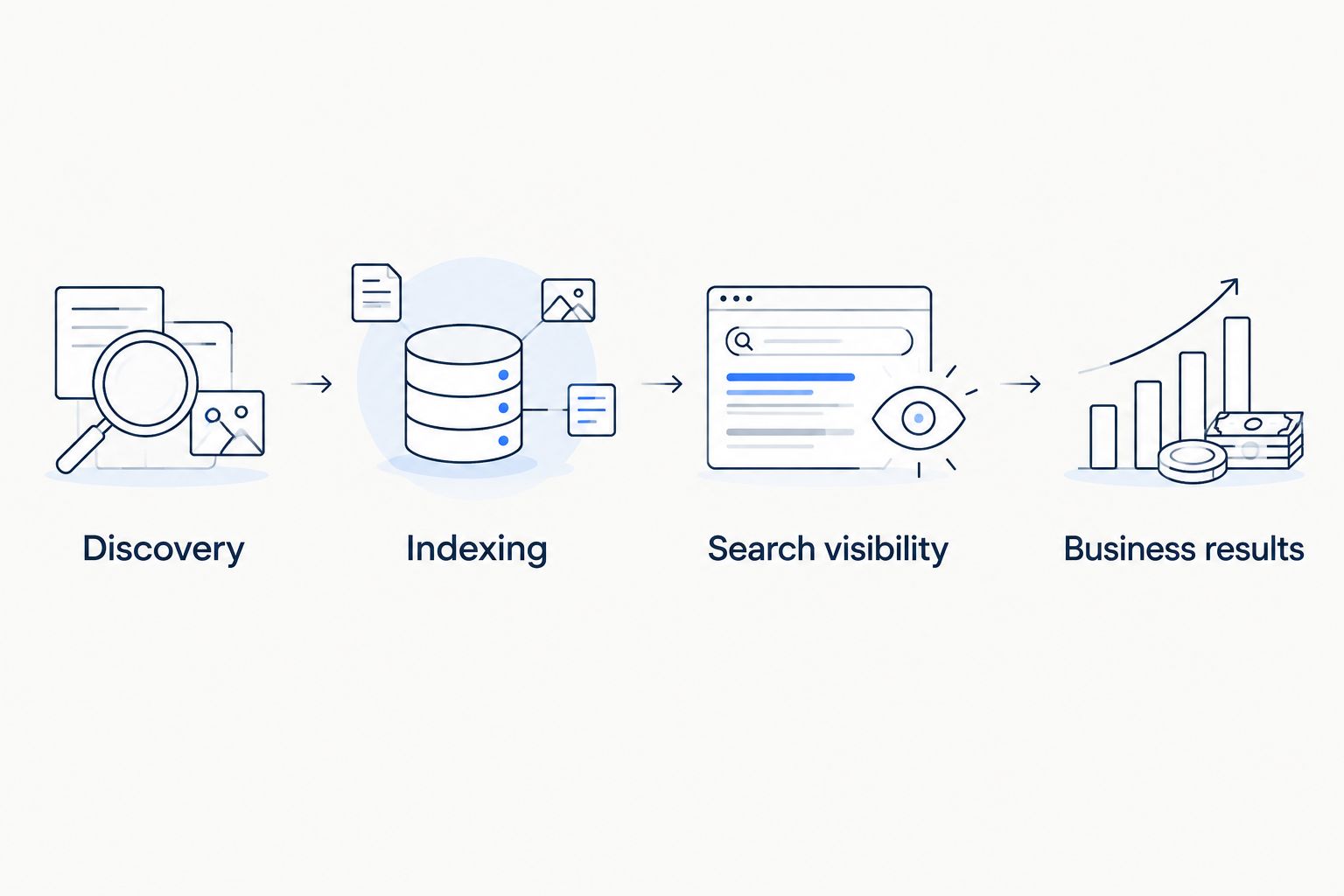
Use these milestones instead of treating launch day as the start of a guaranteed countdown:
- Discovery: Google finds the updated pages through existing links, internal links, or a sitemap.
- Indexing: Google processes the pages and decides which versions to include in search.
- Search visibility: Impressions, rankings, and clicks show how those pages perform for relevant searches.
- Business results: Calls, completed forms, and purchases show whether organic visitors take useful action.
These milestones are not a strictly linear reporting sequence. Existing pages can remain visible while Google processes changes. A successful crawl confirms access, not SEO improvement.
A visual refresh: check preservation before expecting growth
Best for: improving presentation while keeping effective pages intact. If your URLs, main content, and internal links remain substantially unchanged, your first test is whether existing search performance stays intact.
The benefit is a narrower set of changes to investigate. The limitation is equally important: changing fonts, colors, or spacing does not by itself give a page a stronger answer to a customer’s search.
Do not judge the refresh solely by whether rankings rise. Check whether visitors understand your offer, find the next step, and complete the contact process without confusion.
A structural redesign: check old and new pages together
Best for: fixing an unclear website structure or moving to a different platform. Changing URLs, combining pages, or rebuilding navigation requires closer attention to how old pages connect to their replacements.
The benefit is a chance to organize information around customer needs. The trade-off is more migration work: redirects, internal links, canonical tags, and sitemaps must agree about which pages should appear in search.
Use a redesign process that protects Google rankings before launch, not only after traffic drops. Waiting does not repair a missing redirect or restore deleted content.
| Redesign scope | Best for | Main benefit | Main limitation | First SEO check |
|---|---|---|---|---|
| Visual refresh | Improving presentation without replacing useful pages | Keeps established page structure intact | Does not automatically improve relevance | Confirm content and indexing settings remain intact |
| URL or platform change | Reorganizing the website or changing its publishing system | Supports a revised structure | Requires careful migration handling | Test old URLs and their intended replacements |
| Content restructuring | Clarifying services and answering customer questions | Aligns pages with their intended purpose | Removing useful information can weaken relevance | Compare old and new content by topic and intent |
Content changes: judge the page against its intended search
Best for: pages that do not clearly answer the customer’s question. A rewritten service page should explain what you offer, who it serves, and what the visitor should do next.
The advantage is clearer information. The risk is removing details that helped the original page answer relevant searches. Shorter copy is not automatically better copy.
Compare the old and new versions before assuming a traffic decline is temporary. Check whether service descriptions, location information where relevant, useful headings, and internal links survived the redesign. A new layout should not erase the substance customers need.
Why the time to see SEO results varies
These factors explain why two redesigns need different follow-up work. They are diagnostic checks, not a formula for predicting a ranking date.
- URL changes: New addresses require accurate redirects from replaced pages. Redirecting unrelated old pages to the homepage does not preserve their original purpose.
- Crawl access: A launch with blocked crawling or unintended indexing restrictions needs correction, not patience.
- Content changes: Removing or substantially rewriting a page changes the information Google evaluates.
- Internal links: Pages need accessible links from relevant parts of your site. Navigation changes can alter those connections.
- Search intent: A page must answer the question behind the search, not merely repeat its keywords.
- Measurement continuity: Changed analytics tags or broken event tracking can make business results look different even when visitor behavior has not changed.
Start with the factors your redesign actually touched. If URLs stayed the same, investigate content, access, and measurement before assuming a migration problem.
What should you check after launch?
Use this as a 2026 operating schedule, not a forecast of when rankings will improve. The intervals below are recommended review periods; they are not published performance benchmarks.
Launch day: confirm access and tracking
Open your important pages on a phone and desktop. Submit a test inquiry, check the confirmation, and confirm that your measurement system records the intended action.
Test replaced URLs directly. Each should reach the relevant replacement rather than an error page or an unrelated destination. Also check that the live site does not carry indexing restrictions left over from development.
First 7 days: review technical exceptions
Review Google Search Console’s indexing information and inspect priority URLs. Look for access problems, unexpected exclusions, and differences between the page you intend to rank and the version Google selects.
Correct a confirmed technical problem when you find it. A weekly reporting schedule is not a reason to leave a broken form or blocked service page in place.
Every 28 days: compare equivalent performance windows
Compare a 28-day period with another 28-day period, then check page groups and relevant queries rather than total clicks alone. Where historical data exists, account for seasonal differences before attributing every movement to the redesign.
Use the same definitions for qualified inquiries throughout the comparison. A change in how events are counted is not evidence that the redesigned site generated more business.
At 90 days: review the work, not a guarantee
Set a 90-day review to assess what has been fixed, which pages have changed, and whether useful business outcomes are improving. This is a management checkpoint—not a promise that every redesign should produce growth within that period.
If the evidence points to weak content, plan content work. If it points to broken tracking, repair measurement before making another design decision.
How do you tell a measurement problem from an SEO problem?
Start with the point where the numbers diverge. If Search Console clicks remain steady while recorded inquiries disappear, investigate forms, consent settings, analytics tags, and event definitions before blaming search rankings.
If impressions and clicks both fall for a specific group of changed pages, inspect those pages and their old URLs. A sitewide total can hide a problem limited to an important service.
The connection between website redesign and SEO is not simply that one must come before the other: the deciding question is whether the existing website prevents customers and search engines from using its content. That distinction keeps a reporting issue from becoming an unnecessary rebuild.
Keep a dated change log for your 2026 redesign. Record URL changes, content replacements, tracking updates, and technical fixes so performance discussions refer to identifiable events rather than memory.
Should you wait if traffic drops after a redesign?
Do not wait to investigate a traffic drop. Waiting is appropriate only after you have checked for actionable problems and established what actually changed.
Compare affected pages with unaffected pages. Then inspect redirects, indexing settings, page content, internal links, and tracking. A decline concentrated on replaced URLs requires a different response from a decline visible across unchanged pages too.
Avoid repeatedly rewriting pages while you investigate. Unlogged changes make it harder to connect an outcome with its cause. Fix confirmed errors first, record the correction, and monitor the affected pages.
Can a redesign improve leads before rankings improve?
Yes. If the same organic visitors can understand your services and complete an inquiry more easily, the site can produce better business outcomes without receiving more search clicks.
That does not prove SEO growth. Report organic visibility and completed inquiries separately, then connect them using consistent measurement.
The Little Web Design Shop’s website design and maintenance services fit small business owners who need both a functioning website and ongoing upkeep. The service fit does not establish a ranking deadline; assess proposals by their stated scope and reporting commitments.
What should your agency report after a redesign?
Ask for a short report that connects changed pages with observable outcomes. You need enough detail to decide what to fix, not a list of tasks with no explanation of their effect.
For your 2026 reporting brief, request:
- Search visibility: Relevant queries, landing-page impressions, and clicks.
- Technical status: Priority-page access, indexing exceptions, and redirect problems.
- Business outcomes: Completed inquiries or purchases attributed consistently to organic visits.
- Next action: The specific issue to address, the responsible person, and the evidence behind the decision.
When discussing a Web Design Shop website redesign, use that brief to establish expectations before work begins. Ask what is included rather than assuming every design engagement includes content strategy, migration support, or ongoing SEO reporting.
FAQ
How long should I wait for Google to notice my redesigned website?
Google Search Central says recrawling can take a few days to a few weeks. That describes crawling, not a guaranteed deadline for indexing, higher rankings, or additional inquiries.
Will my website redesign automatically improve SEO?
No, a website redesign does not automatically improve SEO. Search performance depends on accessible pages, relevant content, sound migration handling, and other ranking factors—not appearance alone.
Do I need to submit every redesigned page to Google?
You do not need to manually submit every redesigned page. Maintain accessible internal links and an accurate sitemap, and use URL Inspection to investigate important pages when needed.
Is losing traffic after a redesign normal?
A traffic decline after a redesign requires investigation rather than an automatic assumption that it is normal. Check affected URLs, content, indexing settings, redirects, and measurement before deciding to wait.
Can I keep my existing URLs during a redesign?
Yes, you can keep existing URLs when the platform and page structure allow it. Preserving relevant addresses avoids unnecessary URL changes, but you still need to check content, internal links, and indexing settings.
What should I measure for a website redesign in 2026?
Measure search visibility and business outcomes separately for a website redesign in 2026. Review relevant impressions and clicks alongside completed inquiries or purchases, using consistent tracking definitions.
One last thing
An organic visitor is not a qualified inquiry, and a recorded form event is not proof that the inquiry reached you. Submit a real test through the redesigned website and confirm receipt at the destination. Search growth cannot help your business if the contact process fails after the visitor presses submit.